Setting up the DNS server

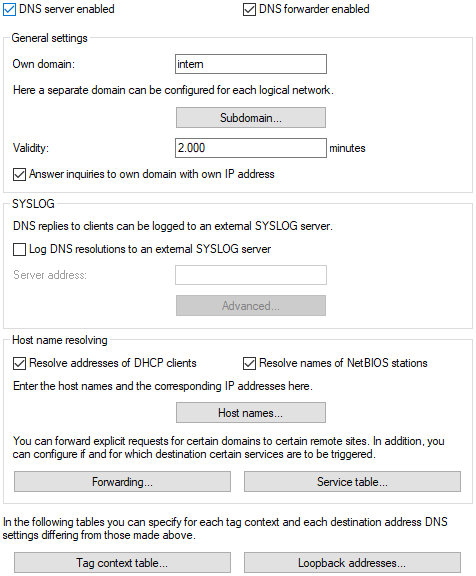
The settings for the DNS server can be found in LANconfig under DNS > General.


  1. Enable the DNS server by checking the DNS server enabled option.

    If the DNS server is to forward the DNS request to another DNS server (DNS forwarding), additionally check the DNS forwarder enabled option.

  2. Enter your own domain where the DNS server is located.

    With the help of this domain, the DNS server recognizes during DNS queries whether the name searched for is located in its own LAN or not. Specifying the domain is optional.

  3. Specify whether the DNS server should use the client information from the DHCP server.
  4. Under IPv4 access from WAN, specify whether access from WAN interfaces to the DNS server or DNS forwarder via IPv4 is generally allowed. Access to these services via IPv6 is controlled exclusively through the IPv6 inbound firewall.

    Access can be controlled globally for the corresponding interface types using this switch. For more granular control than this level, corresponding IPv4 firewall rules can be configured.

    Access to the DNS service must be allowed via VPN if VPN clients are to use the router as a DNS server or DNS forwarder, for example, to resolve locally configured station names.

    Access to the DNS service via WAN must be allowed if clients are to connect to the router using PPPoE, L2TP, or PPTP. In this case, it is recommended to configure granular control for the local DNS service via firewall rules.

    VPN interfaces include IPSec VPN (IKEv1/IKEv2) and WireGuard. WAN interfaces include all WAN counterparts such as Internet connections and RAS dial-ins to the LANCOM router acting as a PPPoE, PPTP, or L2TP server.

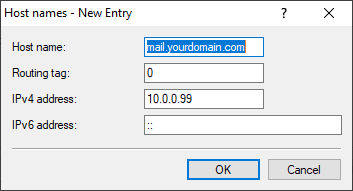
  5. Enter known remote stations and their IP addresses in the Host names table.
    The main purpose of the DNS server is to separate requests for public addresses on the Internet from requests for addresses at other remote sites. Therefore, enter all computers in the table
    • whose name and IP address you know,
    • which are not located in your own LAN,
    • that are not on the Internet and
    • that are accessible via the router.

    For example, if you're working in an external office or in a branch office and the employees want to reach the mail server in the head office (name: "mail.yourdomain.com", IP: "10.0.0.99") via the router, enter:


    Note:

    Specifying the domain is optional, but recommended.

    When an employee now starts his mail program, it automatically searches for the server "mail.yourdomain.com". The DNS server then returns the IP address "10.0.0.99". The mail program then starts a connection to this IP address. With corresponding entries in the IP routing table and remote peer list of the router, the mail program establishes the connection to the mail server in the network of the central office.

  6. To have entire name ranges resolved by a different DNS server, add a forwarding record consisting of the name range and remote site.

    When specifying the name ranges, you may use the wildcards "?" for single characters and "*" for multiple characters.

    To redirect all domains ending with ".internal" to a DNS server on the remote "COMPANY" LAN, create the following entry:
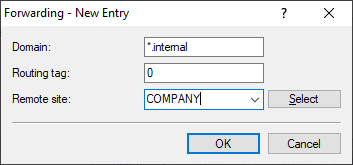


    Note: The DNS server can be specified either by the name of the remote station (for automatic configuration via PPP) or the explicit IP address of the responsible name server.

www.lancom-systems.com

LANCOM Systems GmbH | A Rohde & Schwarz Company | Adenauerstr. 20/B2 | 52146 Wuerselen | Germany | E‑Mail info@lancom.de

LANCOM Logo