The PPPoE server settings are adjusted in LANconfig under .
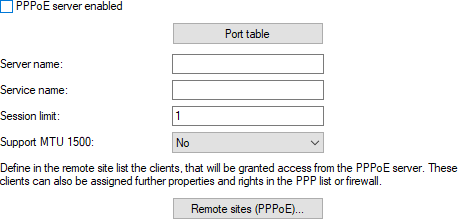
In this view, you have the following configuration options:
- PPPoE server enabled
- Using these settings you globally enable or disable the PPPoE server.
- Port table
- Using this table the PPPoE server can be independently enabled or disabled for every physical or logical interface.
- Server name
- This input field provides the option to give the PPPoE server a name that is independent of the device name (AC-Name = access concentrator name). If you leave this field blank, the PPPoE server uses the device name as the server name.
- Service name
- Enter the name of the service being offered in this input field. The service name makes it possible for a PPPoE client to select a specific PPPoE server. Configure the service name directly on the client.
- Session limit
- This setting specifies how often a client can be logged on simultaneously with the same MAC address. Once the limit has been reached, the server no longer responds to any client requests it receives. A Session limit of 0 stands for an unlimited number of sessions.
- Support MTU 1500
- Defines, if the devices should negotiate a PPPoE MTU of 1500 based on RFC 4638. The remote peer must support this extension as well.
- VLAN ID range
-
The PPPoE server supports Q-in-Q VLANs, i.e. double-tagged VLANs. For incoming PPPoE packets,
LCOS automatically creates the corresponding peers in LCOS.
A range for permitted VLANs can be specified here. A string of up to 64 characters consisting of the digits
0 to 9 and the character '-' for a range, as well as ',' for a list, can be specified.
The list is validated on input. A maximum tag of 4095 may be entered. Tag 0 means "untagged". With the
default "0-4095", all tags are permitted.
Possible entries are individual values, ranges, as well as lists of values and ranges, e.g.
"0,1,20-60,70,100-200,4095". For ranges, the second value must always be greater than (or equal to) the
first value, i.e. "123-123" is valid, whereas "123-122" is not.
If a packet is received with a tag that is not permitted, the PPP trace outputs this accordingly,
e.g.
[PPP] 2025/03/19 18:19:16,051

Received PADI frame from peer b2:8d:ef:36:03:fd for session 0000 on LAN-1
 (VLAN-ID 8 not allowed) => Discard
Default: 0-4095 - S-VLAN ID range
- The PPPoE server supports Q-in-Q VLANs, i.e. double-tagged VLANs. For incoming PPPoE packets, LCOS automatically creates the corresponding peers in LCOS. A range for permitted S-VLANs can be specified here. A string of up to 64 characters consisting of the digits 0 to 9 and the character '-' for a range, as well as ',' for a list, can be specified. The list is validated on input. A maximum tag of 4095 may be entered. Tag 0 means "untagged". With the default "0-4095", all tags are permitted. Possible entries are individual values, ranges, as well as lists of values and ranges, e.g. "0,1,20-60,70,100-200,4095". For ranges, the second value must always be greater than (or equal to) the first value, i.e. "123-123" is valid, whereas "123-122" is not. Default: 0-4095
- Remote sites (PPPoE)
- In this table you define the individual clients which the PPPoE server allows to access the desired services (such as Internet, e-mail) or specific remote stations.
-
Note: The MAC address000000000000 allows a remote station to login to the device with any MAC address. If a specific MAC address is entered, then the PPP negotiation is terminated if the user logs on from a different MAC address.
-
Note: After login, the device attempts to set the Hold time of the remote station. If there is no entry, the device uses the remote site DEFAULT. To prevent the device (as a PPPoE server) from automatically terminating the connection, the hold time must be set to 0.
- In addition to this table, you must make an entry into the PPP table containing the password, the permissions (IP), and other PPP parameters (LCP polling, etc.). Alternatively, you also have the option to authenticate users through a RADIUS server. To do this, you configure the server under . Set the operating mode to Activated (mixed data storage, RADIUS/PPP table).