To configure the settings for the general VoIP parameters, navigate to .
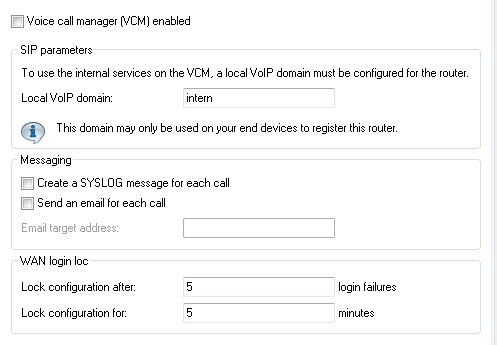
- Voice Call Manager (VCM) enabled
- Enables or disables the Voice Call Manager.
- Local VoIP domain
- Name of the domain in which the connected telephones and the R&S®NC Wireless router are operated.
- Terminal devices working in the same domain register as local subscribers at the R&S®NC Wireless router and make use of the SIP proxy.
- Terminal devices working with the other domain of an active SIP PBX line register themselves as subscribers at an upstream PBX.
- Create a SYSLOG message for each call
- Each time a call is made with the R&S®NC VoIP router a SYSLOG message is created.
Important: Please consider that you can only use this feature with the proper SYSLOG settings.
- Send an e-mail for each call
- Each time a call is made with the R&S®NC VoIP router an e-mail is sent to the defined
address.
Important: Please consider that you can only use this feature if you have set up the appropriate SMTP account.
