You adjust the website-blocking settings here:
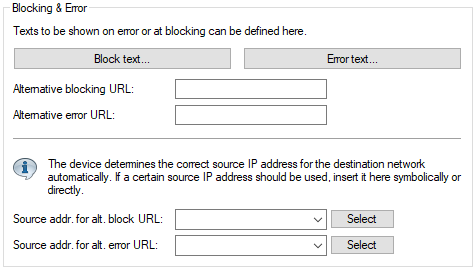
LANconfig:
Command line:
- Alternative blocking URL:
- This is where you can enter the address of an alternative URL. If access is blocked, the URL entered here will be
displayed instead of the requested web site. You can use this external HTML page to display your company's
corporate design, for example, or to perform functions such as JavaScript routines, etc. You can also use the same
tags here as used in the blocking text. If you do not make any entry here, the default page stored in the device
will be displayed..
Possible values:
- Valid URL address
- Blank
- Alternative error URL:
- This is where you can enter the address of an alternative URL. In the event of an error, the URL entered here will be
displayed instead of the usual web site. You can use this external HTML page to display your company's
corporate design, for example, or to perform functions such as JavaScript routines, etc. You can also use the same
tags here as used in the error text. If you do not make any entry here, the default page stored in the device will
be displayed..
Possible values:
- Valid URL address
- Blank
- Source addr. for alt. block URL:
- This is where you can configure an optional sender address to be used instead of the one that would normally be
automatically selected for this target address. If you have configured loopback addresses, you can specify them here
as sender address.
As an address, the device accepts the name of the IP networks whose address is to be used, any valid IP address, or
the name of a loopback address.
Default:
- Blank
Important: If the source address set here is a loopback address, this will be used unmasked even on masked remote clients. - Source addr. for alt. error URL:
- This is where you can configure an optional sender address to be used instead of the one that would normally be
automatically selected for this target address. If you have configured loopback addresses, you can specify them here
as sender address.
As an address, the device accepts the name of the IP networks whose address is to be used, any valid IP address, or
the name of a loopback address.
Default:
- Blank
Important: If the source address set here is a loopback address, this will be used unmasked even on masked remote clients.