RADIUS is used for user authentication and accounting. For further information on this protocol, refer to the section RADIUS.
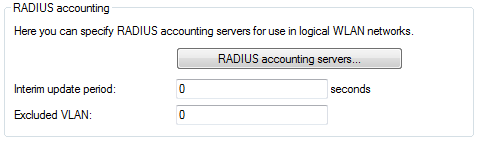
A RADIUS server that is to be used for accounting requires the appropriate configuration. The configuration is carried out with LANconfig under . Configure the settings for a RADIUS accounting server here.
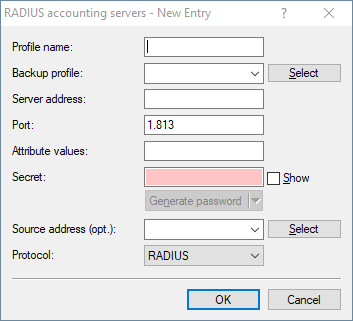
- Profile name
- Name of the RADIUS server performing the accounting for WLAN clients. The name entered here is used to reference that server from other tables.
- Backup profile
- Enter the name of the RADIUS backup server used for the accounting of WLAN clients if the actual accounting server is not available. This allows you to specify a "backup chaining" of multiple backup servers.
- Server address
- Here you enter the IPv4 or IPv6 address or the hostname of the RADIUS server used by the RADIUS client for the accounting of
WLAN clients.
- The RADIUS client automatically detects which address type is involved.
- You also need to set the general values for retry and timeout in the RADIUS section.
- Port
- Port for communication with the RADIUS server during accounting (default: 1,812).
- Attribute values
- Here you can assign user-defined values to RADIUS attributes. The individual name-value pairs must have the form
<Name>=<Value>, and they are separated by semicolons.
<Name> identifies the RADIUS attribute by its name or number. The associated attribute names can be found in the
corresponding RADIUS RFCs. Attribute names can be abbreviated as long as the identifiers are unequivocal.
Attribute values can be set in quotation marks to allow the use of spaces or semicolons in the value definitions. To use a
quotation mark as a character, use a leading backslash. To use the backslash itself as a character, use a double backslash.
It is also possible to use a number of placeholders:
- %n – replaced by the configured device name.
- %e – replaced with the serial number of the device as displayed in the device system info.
- %% – replaced by a single % character.
- %{name} – replaced by the original value of the corresponding RADIUS attribute. Any new / re-definitions within this attribute list are ignored. The identifier can be truncated as long as it remains unique.
- Secret
- Enter the key (shared secret) for access to the accounting server here. Ensure that this key is consistent with that specified in the accounting server.
- Source address
- Here you have the option to configure a sender address for the device to use in place of the one that would otherwise be used
automatically for this target address.
As an address, the device accepts the name of the IP networks whose address is to be used, any valid IP address, or the name of
a loopback address.
Important: If the source address set here is a loopback address, this will be used unmasked even on masked remote clients.
- Protocol
- Select the protocol. Either RADIUS or RADSEC. For more information about RADSEC, please see RADSEC.
- Accounting Interim Interval
- The accounting function in the device can be used to check the budgets of associated wireless LAN clients, among other things. Wireless Internet Service Providers (WISPs) use this option as a part of their accounting procedure. Accounting periods generally switch at the end of the month. A suitable action will cause the accounting session to be restarted at this time. Existing WLAN connections remain intact. A cron job can be used to automate this restart by calling the function do /Setup/WLAN/RADIUS-Accounting/Restart-Accounting.
- Excluded VLAN
- Here you enter the ID of the VLAN that the device is to exclude from RADIUS accounting. The RADIUS server then receives no information about the traffic in that VLAN.